Support / MySQL & phpMyAdmin / How do I delete my SQL web database?

How do I delete my SQL web database?

On the MySQL Administration page, click the “X” icon next to the database you want to delete in the table.
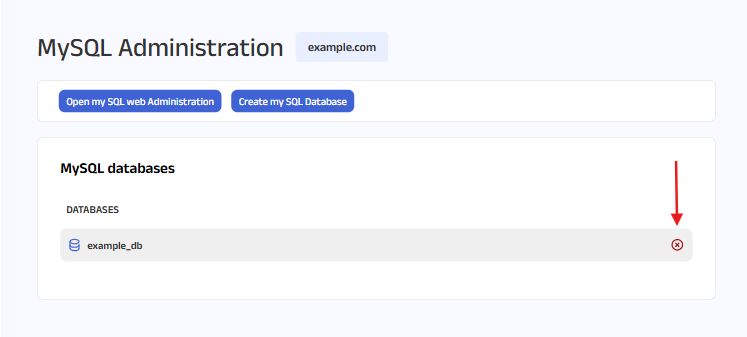
On the MySQL Administration page, click the “X” icon next to the database you want to delete in the table.

A pop-up will appear asking, 'Are you sure you want to reset the MYSQL database? All data will be deleted.'
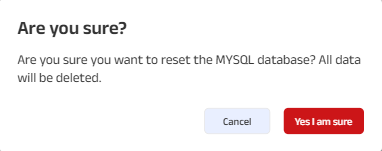
A pop-up will appear asking, 'Are you sure you want to reset the MYSQL database? All data will be deleted.'

If you're sure, click “Yes, I am sure” to proceed. Your database will be deleted. Otherwise, click “Cancel” if you change your mind.

Note: If you need help navigating to this page, please click on this link.

Still can't find what you're looking for?

Contact Support
ellipse iconfooter back ground image
Host Pepper logo
Copyright © 2026 HostPepper. All Rights Reserved.